RAG Basics
Goal
Understand Retrieval-Augmented Generation, or RAG, in a simple developer-focused way.
After this lesson, you should be able to explain:
- what RAG means,
- why RAG is useful,
- how retrieval and generation work together,
- what a basic RAG architecture looks like,
- how documents become searchable context,
- what can go wrong in a RAG system,
- how to build and test a small RAG example.
What is RAG
RAG means Retrieval-Augmented Generation.
Retrieval-Augmented Generation (RAG) combines information retrieval with language generation to produce more accurate, context-aware responses. It uses two components: a retriever, which searches a database to find relevant information, and a generator, which crafts a response based on the retrieved data. Implementing RAG involves using a retrieval model (e.g., embeddings and vector search) alongside a generative language model (like GPT). The process starts by converting a query into embeddings, retrieving relevant documents from a vector database, and feeding them to the language model, which then generates a coherent, informed response. This approach grounds outputs in real-world data, resulting in more reliable and detailed answers.
Retrieval  = search for relevant information
Augmented  = add that information to the prompt
Generation = let the LLM write the final answer
The simple idea:
Do not ask the model to guess.
Give the model useful source text first.
Then ask it to answer.
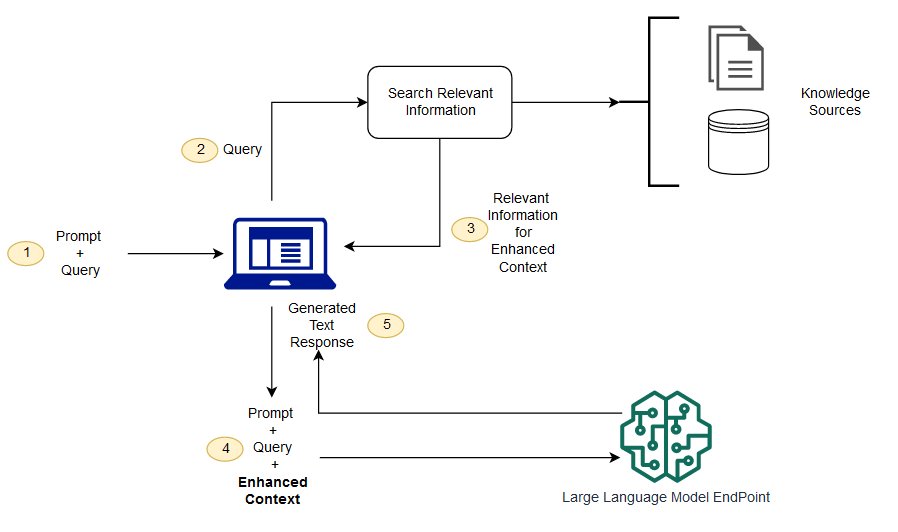
Source image: AWS SageMaker documentation.

Why RAG Matters
LLMs have limits:
- They do not automatically know your private documents.
- They may not know new information after training.
- They can forget details in long conversations.
- They can sound confident even when they are wrong.
- They cannot fit every document into the context window.
RAG helps because it gives the model relevant outside information on demand.
RAG can help a system:
- answer from company documents,
- use newer information,
- reduce guessing,
- cite real sources,
- avoid expensive fine-tuning for every knowledge update,
- answer questions about data the base model never saw during training.
The Basic Picture
User asks a question
        |
        v
Search knowledge source
        |
        v
Retrieve relevant passages
        |
        v
Put passages into the prompt
        |
        v
LLM writes final answer
In one sentence:
RAG = search first, answer second.
Two Main Pipelines
A RAG app usually has two pipelines:
- indexing pipeline,
- question-answering pipeline.
1. Indexing Pipeline
This happens before the user asks a question.
Documents
  -> clean text
  -> split into chunks
  -> create embeddings
  -> store vectors + text + metadata
  -> make the knowledge base searchable
Example:
Company handbook
  -> chunk 1: Password reset policy
  -> chunk 2: Vacation approval process
  -> chunk 3: Expense rules
  -> chunk 4: Laptop return process
Each chunk is embedded and stored so the system can find it later.
2. Question-Answering Pipeline
This happens when the user asks a question.
Question
  -> turn question into search query
  -> retrieve top matching chunks
  -> add chunks to the prompt
  -> ask the LLM to answer using those chunks
  -> return answer with sources
Example:
User:
  "How do I reset my password?"

Retriever finds:
  "To reset your password, open the identity portal..."

LLM answers:
  "Open the identity portal and choose Reset Password. Source: IT Handbook."
Component Breakdown
| Component | What It Does |
|---|---|
| User query | The question or task from the user |
| Retriever | Searches for relevant information |
| Knowledge source | Documents, database rows, tickets, web pages, notes, or files |
| Chunks | Small pieces of documents |
| Embeddings | Number vectors that represent meaning |
| Vector store | Stores embeddings and searches by similarity |
| Metadata | Source, URL, date, owner, permission, category |
| Prompt builder | Combines user question and retrieved context |
| LLM | Generates the final answer |
| Citations | Show where the answer came from |
RAG With Embeddings
Most modern RAG systems use embeddings and vector search.
Document chunk:
  "Employees can reset passwords in the identity portal."

Embedding:
  [0.12, -0.44, 0.87, ...]

User question:
  "How can I recover my account password?"

Query embedding:
  [0.11, -0.40, 0.82, ...]

Vector search:
  These meanings are close, so return the chunk.
This is useful because the user and the document do not need to use the same words.
Simple RAG Example
Imagine this small knowledge base:
Document A:
  Passwords can be reset from the identity portal.

Document B:
  Expense reports must be submitted within 30 days.

Document C:
  Laptops must be returned to IT before the last work day.
User asks:
Where do I reset my password?
RAG flow:
1. Search the knowledge base.
2. Retrieve Document A.
3. Add Document A to the prompt.
4. Ask the LLM to answer only from the retrieved context.
5. Return the answer.
Prompt sent to the LLM:
Use the context below to answer the user.
If the context does not contain the answer, say you do not know.

Context:
Passwords can be reset from the identity portal.

Question:
Where do I reset my password?
Good answer:
You can reset your password from the identity portal.
Bad answer:
You can reset it by calling your manager.
The bad answer is not grounded in the retrieved source.
RAG As A Developer Workflow
For developers, a simple RAG system can be built in this order:
- Choose a small knowledge source.
- Split the documents into chunks.
- Store each chunk with metadata.
- Create embeddings for each chunk.
- Save embeddings in a vector database or local vector index.
- Embed the user's question.
- Retrieve the most similar chunks.
- Put the chunks into the prompt.
- Tell the LLM to answer using only the provided context.
- Return the answer and source.
Prompt Template
A basic RAG prompt should be strict.
You are a helpful assistant.
Answer the question using only the provided context.
If the context does not contain the answer, say:
"I do not know from the provided context."
Include the source name when possible.

Context:
{retrieved_chunks}

Question:
{user_question}
This reduces unsupported answers. It does not fully remove hallucinations, so you still need testing.
When To Use RAG
Use RAG when:
- the answer depends on private data,
- the answer depends on recent data,
- the knowledge changes often,
- users need citations,
- the model should answer from a known source,
- fine-tuning would be too slow or expensive,
- the model needs access to many documents.
Do not use RAG for everything.
RAG may be unnecessary when:
- the task is simple writing or rewriting,
- the answer is already in the prompt,
- the model's general knowledge is enough,
- there is no external knowledge source,
- incorrect retrieval would add more risk than value.